
HourGate – Store Hours for WooCommerce
Take orders only while you’re open. Set your opening hours, close for holidays and pause orders in one click, and shoppers always know when you open next.

Your shop has hours. Your checkout should too.
A bakery, café or florist can only fulfil orders at certain times. WooCommerce takes orders around the clock. HourGate closes that gap.
Without opening hours
- Orders arrive at 2 am that nobody can prepare
- Closing for a holiday means switching off the whole shop
- Shoppers find out you're closed after they've paid
- A busy kitchen has no quick way to stop new orders
- Closed notices are added by hand and forgotten
With HourGate
- Take orders only while you're open
- Close for holidays while shoppers can still browse
- Shoppers see when you open next, before checkout
- Pause orders for 30 minutes, an hour or the rest of the day
- The rules are checked on the server, on every checkout
Opening hours that fit real shops
Everything a shop with opening hours needs, from the weekly schedule to the message shoppers see.
Weekly hours
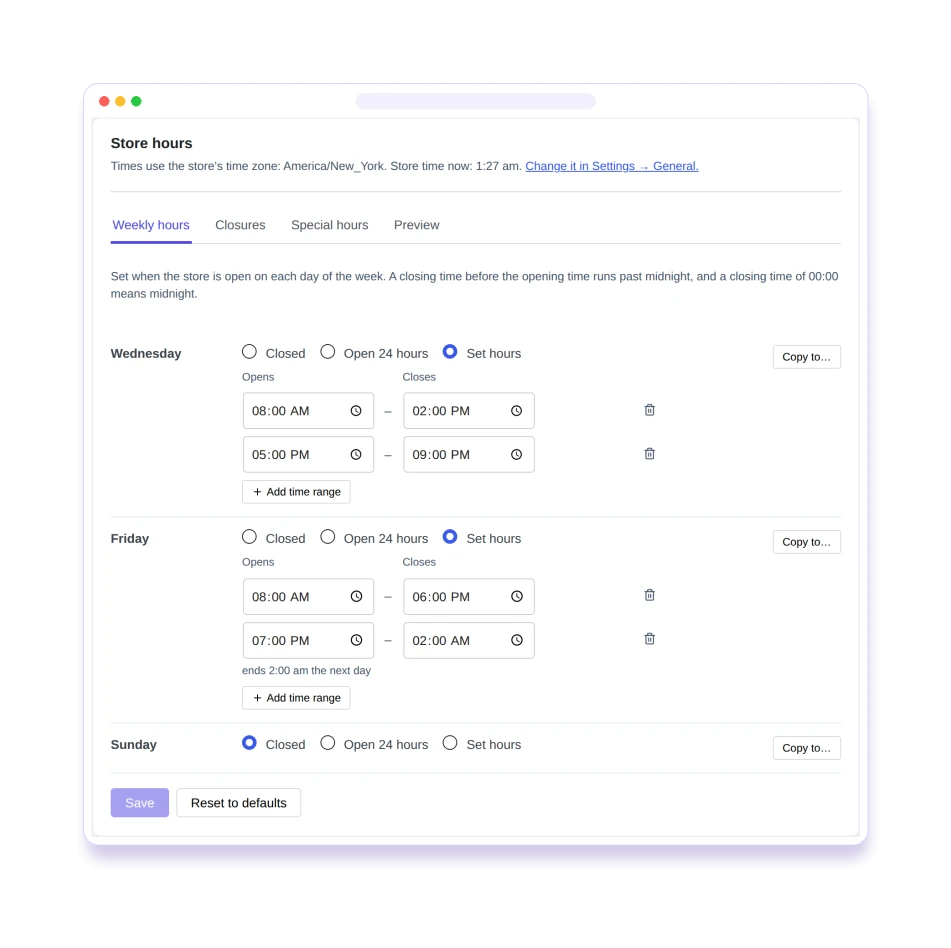
As many time ranges per day as you need, ranges past midnight, days closed, or open 24 hours.
Holiday closures
Close for a date or a range of dates, with a label such as "Christmas" and an optional yearly repeat.
Special hours
Different hours on one date, such as a short day before a holiday.
Pause in one click
Pause ordering from the admin bar for 30 minutes, an hour, the rest of today, or until you resume.
Three closed modes
Block checkout, accept orders for the next opening, or switch to catalogue mode.
Checked on the server
Holds on the Checkout block, the classic checkout, the Store API, add-to-cart and express payment buttons.
Clear closed messages
A closed message with tokens, a notice bar, and cart and checkout notices.
Blocks and shortcodes
"Store status" and "Opening hours" blocks, plus [hourgate_status] and [hourgate_hours].
14-day preview
See the next 14 days exactly as shoppers will, and whether you're open now and why not.
Built for shops that keep hours
Hours that match how you really work
Split shifts, late nights and days off are all normal. Add as many ranges per day as you need, including ones that run past midnight.
- Several time ranges per day, or open 24 hours
- Ranges past midnight, like 6 pm – 2 am
- Uses your site's time zone, and warns about fixed UTC offsets
Close for the holidays, not for good
Close for a single date or a whole vacation. Shoppers can still browse, and the preview shows the next 14 days exactly as they’ll see them.
- Date ranges with a label such as "Christmas"
- Optional yearly repeat
- Special hours for a short day before a holiday


You decide what happens while you're closed
Block checkout, accept orders for the next opening, or switch to catalogue mode. And when the kitchen is busy, pause orders in one click.
- Scheduled orders show their time on the order screen, in e-mails and in My Account
- Pause for 30 minutes, 1 or 2 hours, or until a time you choose
- Orders your staff create are never blocked
Shoppers know before they try to pay
A notice bar, cart and checkout notices, and a closed message that says when you open next. It stays correct behind page caches.
- Tokens for the next opening time and the holiday's label
- A notice bar shoppers can dismiss
- Status is fetched after the page loads, so cached pages stay correct

Made for shops that can't sell around the clock
Bakeries and cafés
Take orders for the hours you bake and serve, and pause when the counter gets busy.
Restaurants and takeaways
Late-night ranges past midnight, and a pause switch for a full kitchen.
Florists
Close for holidays and set special hours for busy dates.
Grocers and local shops
Accept orders for the next opening, with the scheduled time on every order.
Safe to try, strict where it matters
Off until you're ready
Enforcement starts switched off. Set your hours, check the preview, then turn it on.
Staff orders always go through
Admin, REST API, other plugins and subscription renewals are never blocked.
Existing orders can be paid
A customer can always pay for an order they already placed.
Nothing leaves your site
No external services. The status badge only calls your own site's REST API.
Delivery and pickup slots are coming
HourGate Pro will add delivery and pickup slots on top of the free plugin. The free plugin works fully on its own.
Frequently asked questions
Why does my store still take orders after I activated the plugin?
Enforcement is off after install, so you can set your hours first. Turn on “Enforce opening hours” on the Ordering tab. Pausing works even while enforcement is off.
Will it block orders my staff create?
No. Order Window only checks orders shoppers place on your site. Orders created in the admin, through the WooCommerce REST API (for example a POS or phone-order app), by other plugins, and subscription renewals are never blocked.
Can a customer pay for an order while the store is closed?
Yes. Paying an order that already exists (the “Pay for order” page) is allowed at any time.
Does it work with the Checkout block and the classic checkout?
Yes, both, and with direct Store API requests. The rules are checked on the server when the order is placed.
Does it work with page caching?
Yes. Cart and checkout pages are never cached, and every order is checked on the server. On cached pages, the notice bar, status block and catalogue buttons ask the store for the current status after the page loads. We tested with WP Super Cache, W3 Total Cache, WP Fastest Cache and LiteSpeed Cache.
Do express payment buttons (Apple Pay, Google Pay) get around the opening hours?
No. The buttons stay visible, but the store refuses the order when it reaches checkout, with your closed message, and no order is created. We checked the requests the express buttons of WooCommerce Stripe Gateway and WooPayments send, on a test store. A live wallet payment hasn’t been tested yet, so please verify it on your own store.
Which time zone does it use?
The one in Settings → General. Choose a city (for example “Europe/London”) rather than a fixed UTC offset, so your hours follow daylight saving changes. Order Window shows a warning when your site uses an offset.
Can shop managers use it?
Yes. Anyone who can manage WooCommerce can change the hours, the ordering settings and pause ordering.
Do I need HourGate Pro?
No. Order Window works fully on its own. Pro will be an optional add-on for delivery and pickup slots.
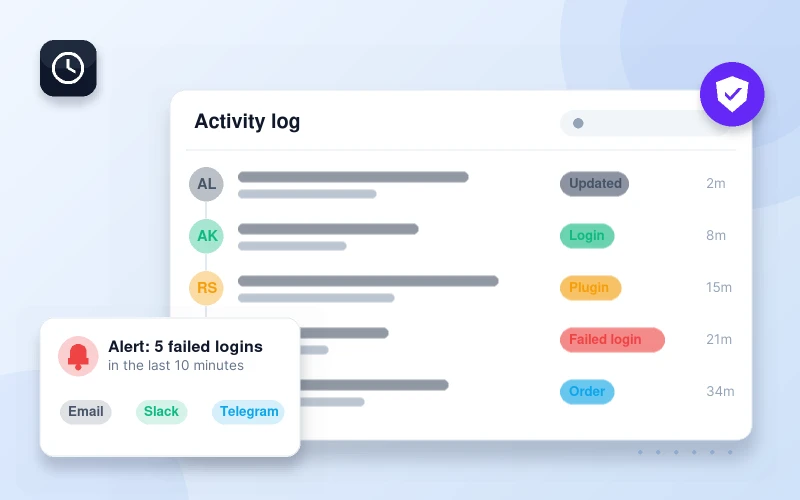
HourGate decides when orders come in. Pastmark shows what changed.
Pastmark keeps a WooCommerce activity log of orders, prices, stock and settings changes, so you always know who changed what.
Take orders only while you're open
HourGate is free. Set your hours, check the preview, and turn it on when you’re ready.